01Motherboard Socket
Processor (CPU) with Virtualisation
A modern 6-to-8-core desktop CPU handles most home labs easily and sips electricity at idle. Check for hardware virtualisation (Intel VT-x or AMD-V) and passthrough support (VT-d or AMD-Vi).
A server is simply a reliable computer built to stay on 24 hours a day to run your apps, smart-home tools, media, websites and virtual machines.
A home lab server does NOT need to be loud, heavy "enterprise" data-centre equipment. What matters is reliability, low idle electricity use, quiet cooling and enough memory and storage for the actual jobs you want to run.
Using free virtualisation software (called a hypervisor, such as Proxmox VE), a single modern server can safely act like ten separate computers at once: running isolated Virtual Machines (complete simulated computers) and lightweight Containers (apps sharing the host system) side by side.
File storage, websites, password managers, smart-home apps, virtual machines and even most home video streaming do NOT need a dedicated graphics card (modern Intel CPUs with built-in Quick Sync handle video transcoding easily). Only add a GPU if you plan to run local AI models, pass a GPU straight to a gaming VM, or transcode many heavy video streams at once: otherwise a GPU only adds cost, heat and electricity bills.
A modern 6-to-8-core desktop CPU handles most home labs easily and sips electricity at idle. Check for hardware virtualisation (Intel VT-x or AMD-V) and passthrough support (VT-d or AMD-Vi).
32 GB is a great starting point (64 GB for many virtual machines). Error-Correcting Code (ECC) memory fixes tiny bit glitches automatically: recommended for important storage servers, though standard non-ECC RAM is fine for replaceable data.
Look for enough SATA and M.2 drive ports, PCIe slots for network cards, and built-in 2.5 Gigabit Ethernet. Server boards include remote console access (IPMI/BMC); on desktop boards, a small external IP-KVM can do the same job.
Mirror two NVMe or SATA solid-state drives so your server keeps running if one drive dies. For heavy database or VM writes, SSDs with Power-Loss Protection last much longer.
Pick a reputable 80 PLUS Gold power supply sized sensibly for your real wattage: grossly oversized power supplies waste electricity when a server idles.
A few large, slow, quiet fans move plenty of air without whining. Keep hard drives cool, because heat shortens drive life.
Built in a normal desktop computer tower with plenty of drive bays and big, whisper-quiet fans. Flexible, easy to cool, low idle power and simple to upgrade with standard parts.
Tiny, near-silent, affordable and sips just 10 to 25 watts at idle. Ideal for starter and medium labs, firewalls or extra cluster nodes: limited mainly by having fewer hard drive bays.
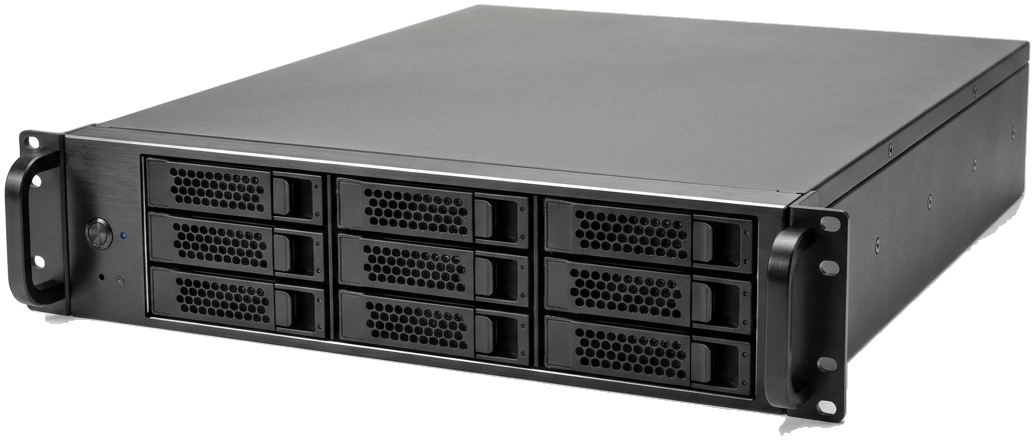
Fits neatly into a 19-inch rack with front hot-swap drive trays and remote out-of-band management (IPMI). Costs more and requires checking rack depth, but excels for larger labs and heavy storage.
Often cheap to buy secondhand, but home lab owners frequently regret them: older enterprise servers can sound like jet engines and burn 150 W+ all day (over 1,300 kWh per year). Only choose one if you truly need remote IPMI, huge ECC RAM or many PCIe slots and have a separate room for it.
| Form Factor | Strengths | Trade-Offs | Best Fit |
|---|---|---|---|
| Mini PC / Small Desktop | Very low electricity use, silent, inexpensive | Few hard drive bays, limited expansion slots | Light-to-medium labs, firewalls, extra nodes |
| Custom Tower Server | Quiet, flexible, easy cooling, many drive bays | Sits on a floor or shelf rather than in a rack | Best general choice for most home labs |
| 2U / 4U Rack Server | Hot-swap bays, remote console (IPMI), rack-ready | Higher cost, needs a deep rack | Larger rack-mounted labs and big storage |
| Used Enterprise 1U/2U [CONDITIONAL] | Cheap purchase price, lots of RAM/PCIe slots | Loud fans, high 24/7 power bills, older CPUs | Only if you truly need enterprise features & a separate room |
| Drive Type | Best Used For | Key Tip |
|---|---|---|
| NVMe Solid-State Drive (SSD) | Operating system, virtual machines, apps, databases | Mirror two drives; prefer power-loss protection for heavy writes |
| SATA Solid-State Drive (SSD) | Boot drive, lighter apps and virtual machines | Reliable and budget-friendly |
| 3.5-Inch Hard Disk Drive (HDD) | Bulk photos, movies, files and backups | Always choose CMR drives: NEVER SMR (shingled) drives for RAID/ZFS |
Use the simple formula: idle watts × 8.76 = kilowatt-hours (kWh) per year. A 25 W mini PC uses ~219 kWh/year; a 150 W old enterprise server uses ~1,314 kWh/year.
Proxmox needs at least 2 GB for itself plus memory for every virtual machine: and roughly 1 GB of extra RAM per terabyte of used ZFS storage. Start with 32 GB (or 64 GB for many VMs).
Confirm CPU and motherboard support Intel VT-x or AMD-V (required for virtualisation). If you want Error-Correcting Code (ECC) RAM, BOTH the CPU and motherboard must officially support it.
If adding extra SATA drives for modern file systems like ZFS, use a plain Host Bus Adapter (HBA) card in pass-through (IT) mode: never a hardware RAID card that hides real drive health.
A quiet, modern 6-to-8-core desktop CPU or mini PC with 32 GB RAM runs dozens of useful self-hosted apps at a fraction of the noise and electricity bill of an old data-centre server.
Match CPU socket, DDR4 vs DDR5 memory, ECC support, and verify whether M.2 SSD slots disable any SATA ports on the motherboard.
Use at least 2.5 Gigabit Ethernet (or 10G SFP+) with chips that have mature drivers in Proxmox or Linux.
High monthly electricity bills and constant fan noise for workloads a quiet mini PC could handle easily.
Virtual machines and ZFS storage run out of memory long before the CPU ever gets busy.
Hides real drive errors from ZFS and risks losing the whole storage pool: use a pass-through HBA card instead.
Wastes money, raises idle electricity draw and makes virtualisation setup more complex.